首頁/

遊戲/

棋牌/

Similo: The Card Game

Similo: The Card Game
3.05+

Similo: The Card Game

合作猜謎遊戲

使用雷電模擬器在PC電腦上暢玩
recommend
Horrible Guild
如何在電腦上下載Similo: The Card Game
近期更新: 2025-12-31
com.horriblegames.similo
分享:
  • 概述

  • FAQ

使用雷電模擬器在電腦上玩Similo: The Card Game

Similo: The Card Game是Horrible Guild開發的一款能夠在行動裝置上運行的棋牌應用程式,但使用最好的Android 模擬器-雷電模擬器 ,你可以在電腦上下載並暢玩Similo: The Card Game。

在電腦上運行Similo: The Card Game,您可以在大螢幕上清晰地瀏覽, 而用滑鼠和鍵盤操控應用程式比用觸摸屏鍵盤要快得多,同時你將永遠不必擔心設備的電量問題。

通過多開和同步功能,你甚至可以在PC上運行多個應用程式和帳戶。

而文件互傳功能讓分享圖像、影片和文件也變得非常容易。

下載Similo: The Card Game並在PC上運行。享受PC端的大螢幕和高畫質畫質吧!

ATTENTION: online services for our digital board games are temporarily suspended starting September 30th because our provider GameSparks is ceasing operation. We are working on a new, better online integration which will be online in the next few months and available in an update. Meanwhile, all offline modes are fully operational.

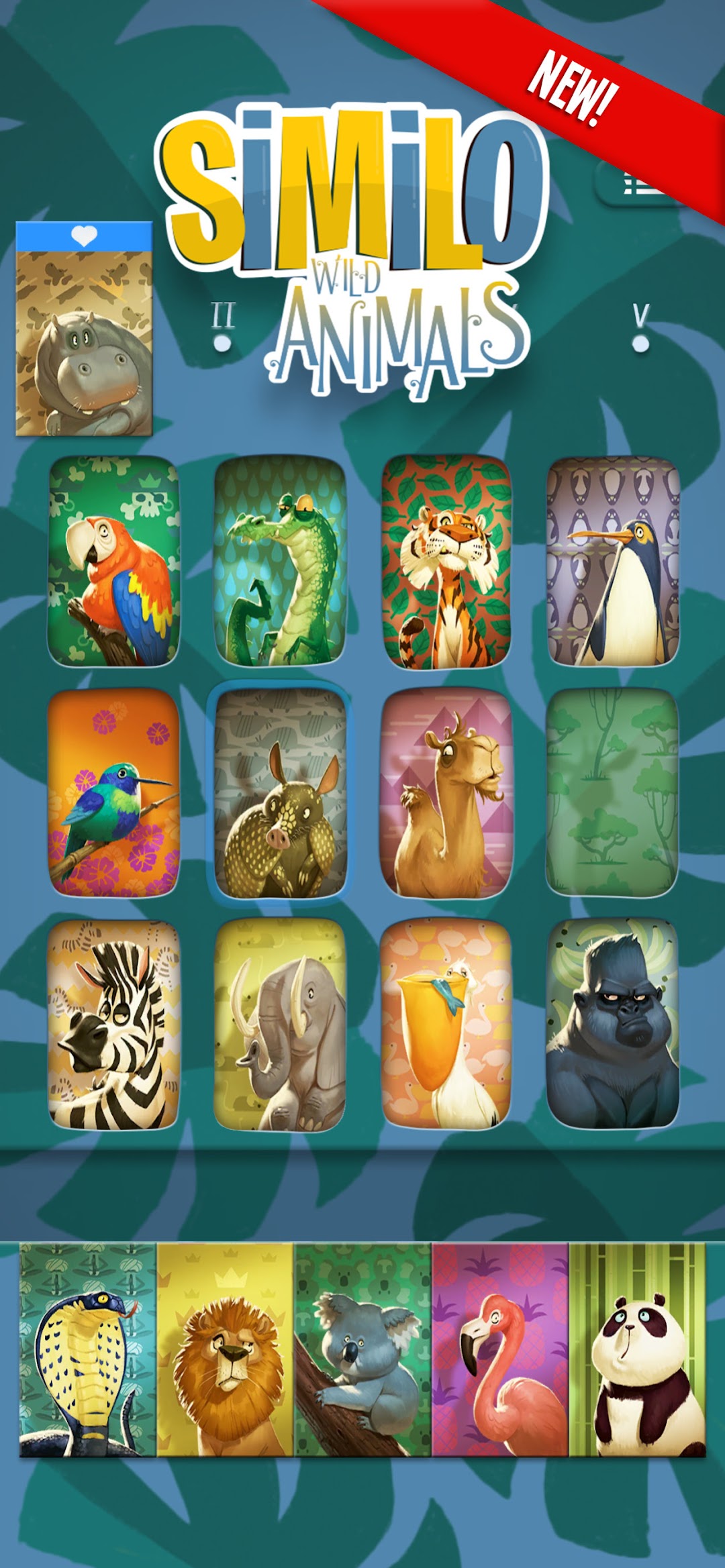
The official adaptation of Similo, the critically acclaimed cooperative guessing game illustrated by world famous artist Naïade. Play together with players from all over the world Online or locally with your friends in Local Pass & Play mode!

Similo: Animals is included! Play with 30 cards including Horse, Rabbit, Cat, Wolf, Deer, and many others: all your favorite pets from the farm, the forest, and more.

Similo: Fables and Similo: History are also available as in-app purchases, with more decks coming soon, and remember: you can also combine your decks for maximum fun!

In Similo, you have five rounds to help the other players find the secret card among the twelve shown. Play more characters as clues, to suggest similarities or differences with the secret card.

After each clue, the other players must discard 1 or more characters from the roster. If they discard the secret card, you all lose! But, if the secret card is the only one left, you all win!

HOW TO PLAY

One player acts as the Clue Giver, the other players will be the Guessers. During their turn, the Clue Giver must play 1 Character from their hand as a clue, suggesting if they have something in common or something different from the secret character.

Then, the Guesser(s) must discard an increasing number of characters (1 on the first round, 2 on the second, and so on). If they remove the Secret Card, the game ends immediately and you all lose. If the Secret Card is the only one left at the end of the fifth round, you all win!

PASS & PLAY AND ONLINE MULTIPLAYER MODES
Play with your friends with the local pass and play mode, or join games with players from all over the world with online multiplayer!

• The wonderful art of the card game by Naïade, fleshed out and digitally enhanced
• Social deduction gameplay, try to decrypt the minds of your friends and create the perfect clues
• Local Pass & Play Mode for 2 to infinite players, the perfect party game
• Online Multiplayer Mode! Join 1 on 1 matches with people from all over the world

To find more information about Horrible Guild, please go to https://www.horribleguild.com
Having an issue? Looking for support? Please contact us: https://www.horribleguild.com/customercare/
You can follow us on Facebook, Twitter, Instagram, YouTube, and Twitch!
Facebook: https://www.facebook.com/horribleguild/
Twitter: https://twitter.com/horribleguild
Instagram: https://www.instagram.com/horribleguild/
YouTube: https://www.youtube.com/c/horribleguild
Twitch https://www.twitch.tv/horribleguild

Languages available: English, Italian, German, Spanish, and French.
展開

Similo: The Card Game PC版的截圖和影片

透過雷電模擬器下載并在電腦上暢玩Similo: The Card Game ,享受更寬闊的視野,更精緻的遊戲畫面,更酷炫的戰鬥技能和特效。極致完美的遊戲體驗,盡在雷電模擬器。
為什麼使用雷電模擬器在電腦上玩Similo: The Card Game ?

雷電模擬器提供獨有的模擬器功能,包括多實例支持、巨集指令、操作錄製以及行動裝置上不提供的其他功能。

多開和同步功能

遠端操控

鍵盤操控

多開和同步功能遠端操控鍵盤操控

輕鬆複製多個模擬器視窗,然後開始同步過程,直到您抽到喜歡的英雄再綁定您的帳號,更有效率地在Similo: The Card Game中進行遊戲刷首抽(reroll)操作。

  • 高幀率

    在高FPS的支援下,Similo: The Card Game遊戲的畫面更加流暢,動作更加連貫,增強了玩Similo: The Card Game的視覺體驗和沉浸感。
  • 影片錄製

    輕鬆記錄下在Similo: The Card Game中的賽事表現和操作過程,有助於學習和改進駕駛技術,或者與其他玩家分享自己的遊戲經歷和成就。

如何在電腦上下載Similo: The Card Game

  • 1

    在你的電腦下載並安裝雷電模擬器

  • 2

    在雷電模擬器的系統應用中找到GooglePlay商店,啟動並登入你的谷歌帳號。

  • 3

    在搜索框中輸入並搜尋Similo: The Card Game

  • 4

    從搜尋結果中選擇並安裝Similo: The Card Game

  • 5

    完成下載安裝後,回到雷電模擬器首頁。

  • 6

    點擊雷電模擬器首頁上的遊戲icon就可以開始享受精彩的遊戲了。