ZWILLING是ZWILLING J.A. Henckels AG開發的一款能夠在行動裝置上運行的應用程式,但使用最好的Android 模擬器-雷電模擬器 ,你可以在電腦上下載並暢玩ZWILLING。
在電腦上運行ZWILLING,您可以在大螢幕上清晰地瀏覽, 而用滑鼠和鍵盤操控應用程式比用觸摸屏鍵盤要快得多,同時你將永遠不必擔心設備的電量問題。
通過多開和同步功能,你甚至可以在PC上運行多個應用程式和帳戶。
而文件互傳功能讓分享圖像、影片和文件也變得非常容易。
下載ZWILLING並在PC上運行。享受PC端的大螢幕和高畫質畫質吧!
With the ZWILLING app we bring to you our newest designs, features and product ideas.Experience the future of ZWILLING Culinary World.
What connects people around the world more than food and drink? Get inspired: by refined recipe suggestions from around the world, easy as meal preparation, and practical storage thanks to the innovative FRESH & SAVE vacuum system.
Inspiring the culinary world
Everything with a single click
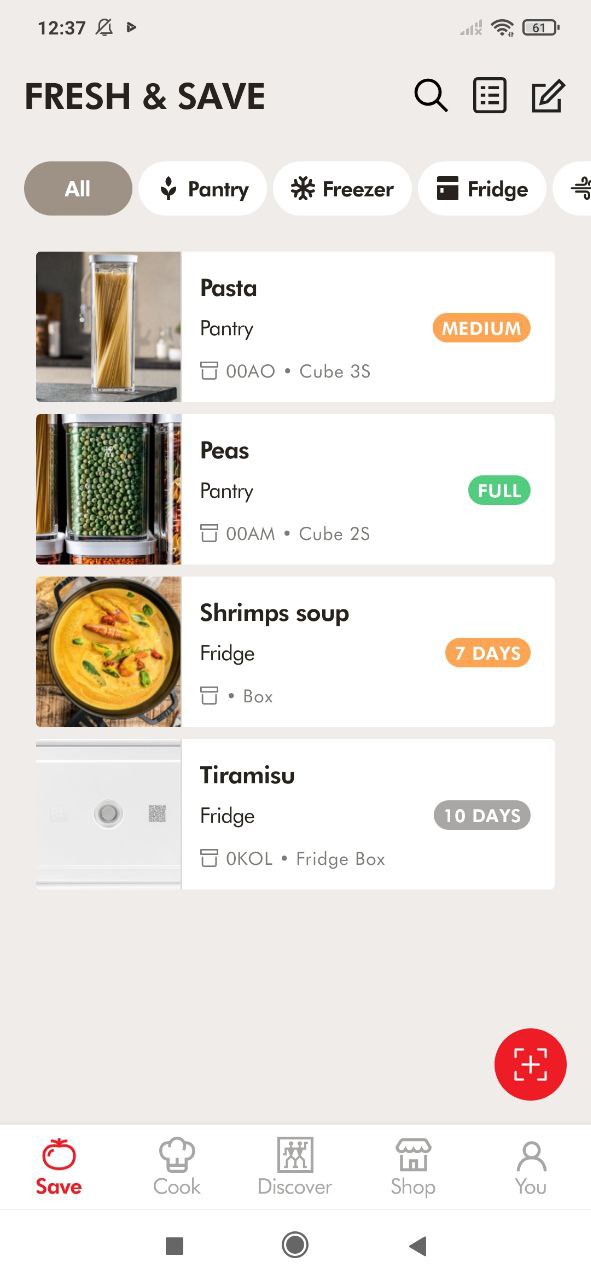
What shall I cook today? The app has the answer: Refined dishes from the culinary ZWILLING world with easily understood instructions for the perfect result. Everything that you need for the dish lands on your personal shopping list with just one click on the ingredients. And if there are leftovers, keep them fresh for up to 5x longer with the new ZWILLING FRESH & SAVE vacuum system. The app supports the FRESH & SAVE system and offers a practical organizer function for your fridge and freezer.
FRESH & SAVE: Vacuum-seal with a system
With the ZWILLING Culinary World App you always know what you have vacuum-sealed and how long it will stay fresh. Simply scan the QR code on the FRESH & SAVE boxes and bags with your mobile and select the relevant food group for your vacuum-packed food. The app automatically reminds you to use the food that needs it. Food waste is a thing of the past!
Recipes: something for everyone
There is a lot to discover in the wonderful ZWILLING recipe world: fresh smoothies, small snacks, crunchy salads, delicious soups. Do you prefer vegetarian or vegan or something with meat, poultry, or fish? There is something for everyone! If you need more or fewer ingredients for the number of people or because you are only cooking for yourself, it is very easy to change the desired quantities.
ENFINIGY: the new generation of kitchen devices
Aesthetic design, perfect function, essential for modern households - there are recipes that have been especially developed for the brand-new ZWILLING ENFINIGY series, for example to use the high performance mixer, multi-functional kettle, or essential toaster. Easy to understand, step-by-step instructions and videos show how easy the recipes are to prepare. “Fast food” - with a new interpretation.
Shopping list: Shopping made easy
Have you found the perfect recipe but do not have the ingredients? You will get a corresponding shopping list with just one click. Simply delete what you don’t need. And just add anything missing from the store cupboard manually.
Practical searching: How and where to find things?
What is the easiest way to find your favorite recipe? The quickest way: type in an ingredient, e.g. bell pepper, and get lots of ideas for this vegetable. Or do you want to use the mixer? Then you can find suggestions for what to prepare in it. Would you like a quick Asian soup or a classic club sandwich? Simply enter this food request and discover how easy it is to prepare these dishes with the kettle or toaster.