


Pixel Cat (Goal Based)是InkedFace開發的一款能夠在行動裝置上運行的個性化應用程式,但使用最好的Android 模擬器-雷電模擬器 ,你可以在電腦上下載並暢玩Pixel Cat (Goal Based)。
在電腦上運行Pixel Cat (Goal Based),您可以在大螢幕上清晰地瀏覽, 而用滑鼠和鍵盤操控應用程式比用觸摸屏鍵盤要快得多,同時你將永遠不必擔心設備的電量問題。
通過多開和同步功能,你甚至可以在PC上運行多個應用程式和帳戶。
而文件互傳功能讓分享圖像、影片和文件也變得非常容易。
下載Pixel Cat (Goal Based)並在PC上運行。享受PC端的大螢幕和高畫質畫質吧!
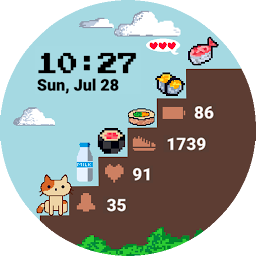
Wake up and feed your pet cat in a cute pixel game like setting as you move towards your STEPS fitness goal!- Steps goal based dynamically changing background
- Supports digital time (supports 12/24 hour time format) and date
- Displays battery remaining percentage, steps taken, heart rate, and unread notifications (from top to bottom)
- One editable complication slot (Choose from Wear OS complications available for your device)
- Specially designed battery friendly Always-on screen
- Supports Watches running Wear OS 3.0 (API level 30) or higher(Does not support Tizen OS Watches)
*** For Wear OS watches only ***
Do leave us a kind review if you liked our work and email us if you are facing any issues!


